Home / Dashboard
The screen that tells you, in ten seconds, whether your account is working and whether it is working safely.
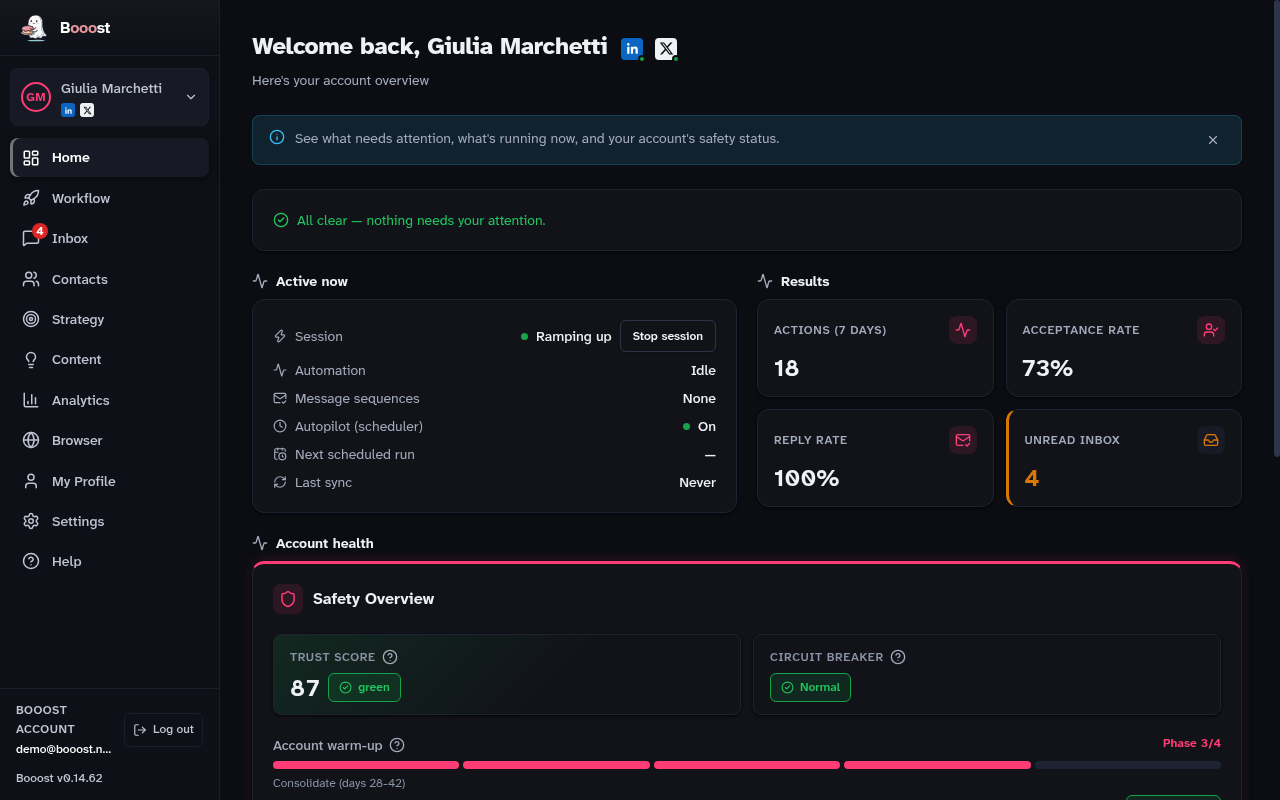
What is on this page
- Channel marks — next to your name, a mark for every connected channel (LinkedIn, X), with a dot for its session state; click one to go and manage it in My Profile
- Getting Started — the setup checklist, which disappears once you finish it
- Needs attention — the things that are blocking something, each with the button that fixes it
- Active now — what Booost is doing right this moment
- Trust Score — a 0-100 score on the health of the account
- Warm-up — the current phase (0 to 4) and how long until the next one
- Daily limits — how many actions you have spent today, per type
- Circuit breaker — whether the automatic protection has tripped
- Results — how the week went
Starting from X instead of LinkedIn
Before any persona exists, Home offers "Start with X" next to the usual LinkedIn detection: the persona is created from an X login, and you connect LinkedIn later, whenever you want, from My Profile. Once a persona exists without LinkedIn, this page instead shows a "LinkedIn is not connected" notice with a button to add it — it attaches LinkedIn to this same persona, no second one is created.
How to read the Trust Score
The Trust Score combines five factors: how often your connection requests are accepted, how many recent incidents there have been, how complete your LinkedIn profile is (photo, headline, about, experience, cover), how far along warm-up is, and how dense your interactions are.
The higher it is, the more daily allowance you get. It moves on its own, day by day.
If you run more than one account
With more than one account connected, Home does not open on one of them: it opens on an overview of all of them, with the state of each. From there you go into the one you need. Limits, warm-up and Trust Score stay separate per account, because they are properties of that account on LinkedIn, not of the app.