Contacts
The people Booost knows about, in one list: the ones you imported, the ones collected from searches and campaigns, and — if you have connected X — the people read from its follower and following lists.
One list, several channels
A row is a person, not an account. Someone who is both a LinkedIn connection and a confirmed X identity is a single row, with a mark for each channel next to their name and @handle where they have one. Someone who only exists on X — read from your followers or following, not yet a LinkedIn contact — is still a row here; opening it turns them into a contact, the same way opening a row from the old X-only view used to.
- List view — the full table, with search and filters for company, role, school and past company
- To contact — who you have not approached yet, so you do not have to fish them out by hand
- Graph view — the connections between contacts, plus who follows whom on LinkedIn and on X, so you can see who can introduce you to whom
- Import — a CSV with first name, last name, LinkedIn URL, company and role
- Tags and notes — your own labels, which then become filters
- Export — the selected contacts as CSV
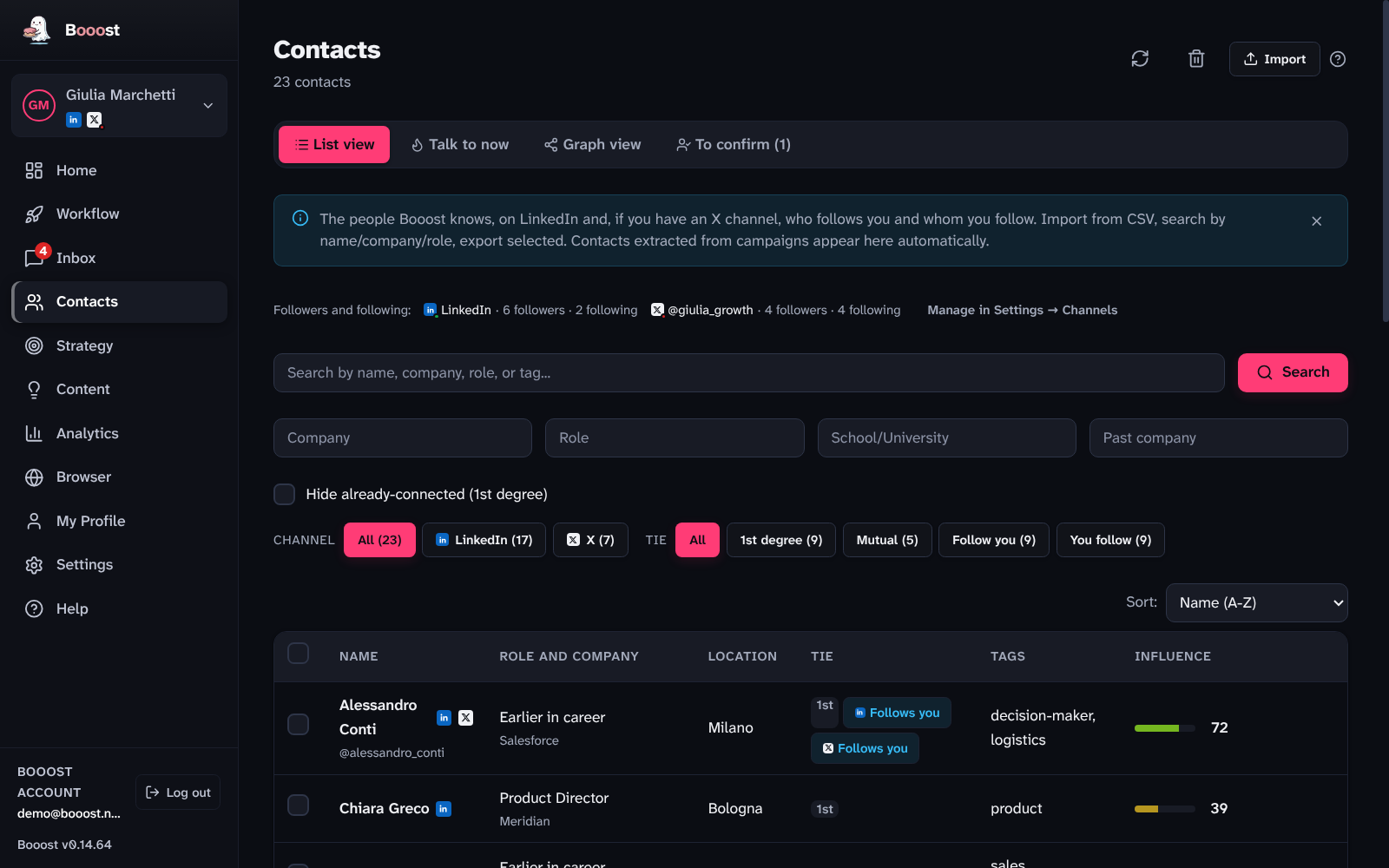
Two columns read across channels: "Role and company" falls back to the X bio for someone who is only on X, and "Tie" shows the «1st» badge for a direct LinkedIn connection and, per channel, whether you are mutual, they follow you, or you follow them — a badge with the LinkedIn mark for LinkedIn, one for X. Someone who follows you on LinkedIn without being connected shows up here too, as a LinkedIn row.
As soon as a channel reads its lists (LinkedIn or X), two chip rows sit above the table: Channel (All / LinkedIn / X) and Tie, each with a count, to narrow the list to one side of it.
Reading who follows you, on LinkedIn and on X
Follower and following lists are read per channel, and the switches live where the channel lives: Settings → Channels, in each channel's card, under "Followers and following on LinkedIn" or "Followers and following of @handle". Reading is off by default — it is other people's data, not yours — with four commands: Turn on reading, Read now, Turn off and Delete the data read (which also forgets any notes or tags on people who exist only because of these lists). Once on, long lists arrive in batches over several days, never in one go, and a background round every 12 hours or so picks up only what changed.
On the Contacts page all of this is one thin line above the filters — "Followers and following: LinkedIn · 292 followers · 4 following · X · reading off" — with a "Manage in Settings → Channels" button. The page used to carry one box per channel up here; they took half the screen and said the same thing.
On LinkedIn the lists are the ones under "My network → Manage": Booost reads them with your account's session, ten people a page at a reader's pace, inside the account's active hours and never with the safety switch open. A follower who is already a contact is recognised by their LinkedIn id, so the row is one; one who isn't becomes a LinkedIn row with their headline. One thing that means something else on LinkedIn: "following" only lists people you follow without being connected — connections are followed automatically and aren't in that list, so "Follow" never appears next to "1st".
Confirming who someone on X really is
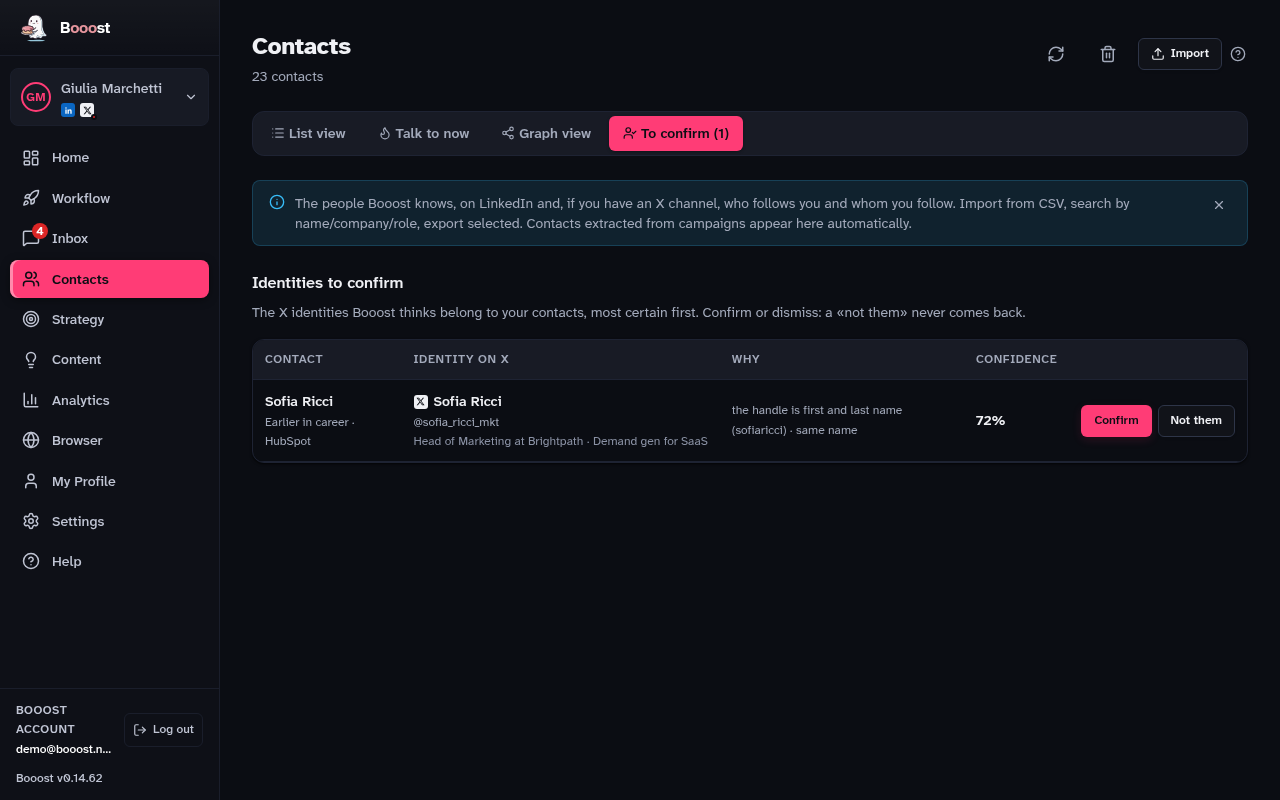
When Booost recognises that an X identity and a LinkedIn contact are probably the same person — a link in the bio, a matching name and company — it proposes the match instead of merging it on its own. The "To confirm" tab lists every proposal, most certain first, with the confidence percentage and why Booost thinks so. Confirm merges them into one card; "Not them" dismisses it for good; "Assign by hand" searches the channel's own followers and following when Booost has not proposed anyone.
The 360° card
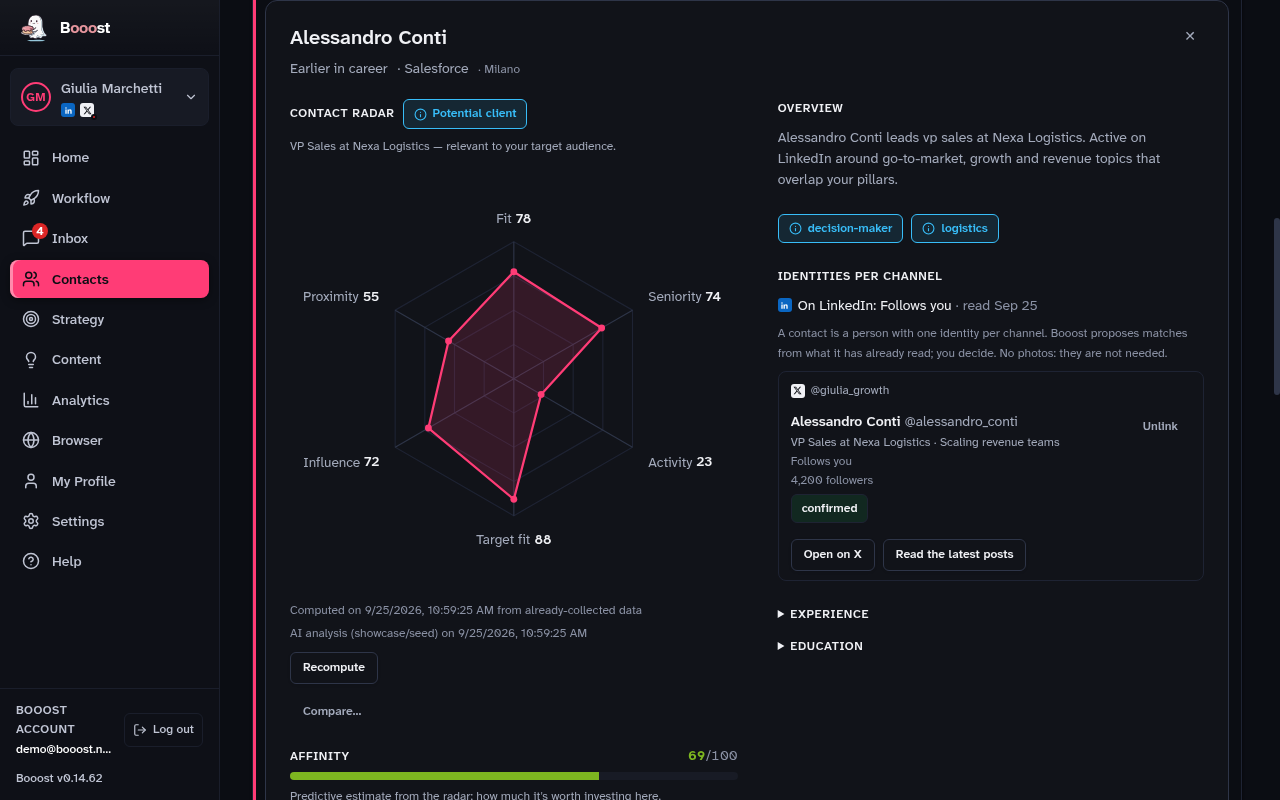
Opening a row shows everything Booost has about that person in one place: "Identities per channel" lists each platform identity with its own follower count, bio and tie; the radar switches between "Person" (one score) and "By channel" (one axis per platform); and "Read the latest posts" pulls a channel's recent posts on demand — they are saved and feed both the radar's Activity axis and the AI analysis, the same way LinkedIn post snapshots already did.
Importing a CSV
- Press Import, top right.
- Choose the file. The recognised columns are first name, last name, LinkedIn URL, company and role.
- Check the preview and confirm.
Contacts and targets are not the same thing
A contact is someone already in your address book: often already a 1st-degree connection. A target is someone you want to bring into your network, and who is not connected to you yet.
They are two separate lists on purpose, and they live on two different pages: contacts here, targets under Strategy. When a target search imports someone who is already a connection, they are dropped — not by mistake, but because they would be in the wrong place there.